
October 12, 2026
Desktop Fingerprint Emulation for Linux Headless Crawling with Chrovia
How Chrovia emulates Windows and macOS desktop fingerprints at the Chromium kernel level for Linux headless Playwright workflows, with Fingerprint.com Pro field test results.
Linux servers are the default infrastructure for automated web scraping and crawling pipelines: they are cost-effective, easy to containerize, and simple to scale horizontally. To minimize memory and CPU overhead, production scraping workloads almost universally run in headless mode.
However, this setup creates an immediate operational challenge: modern anti-bot and fraud detection systems are keenly tuned to detect Linux and headless execution environments.
To keep scraping tasks from getting blocked, developers typically try to make their scrapers appear as regular desktop users on Windows or macOS. But attempting this with user-space injection scripts quickly runs into structural limits. Chrovia delivers cross-platform desktop fingerprint emulation directly inside the Chromium kernel. On Linux headless servers, developers can launch instances that present authentic Windows or macOS characteristics out of the box—without maintaining fragile JavaScript patches.
Why Emulating Desktop Fingerprints on Linux Headless Is Hard
Many engineering teams start by using Playwright or Puppeteer with stealth plugins, manually patching navigator.userAgent or tweaking prototypes. While this may slip past rudimentary rules, sophisticated fingerprinting engines (such as Fingerprint.com, Cloudflare Turnstile, and DataDome) detect the discrepancies almost immediately.
These failures usually stem from three deeper layers of the browser runtime:
1. Context Leaks across Web Workers
Script injection typically operates inside the main document's DOM and window environment. When a website spins up a Dedicated Worker, Shared Worker, or Service Worker, these background threads run in separate execution contexts where DOM-level patches cannot easily reach. A fingerprinting script can simply query navigator.platform or navigator.userAgent inside a Worker to uncover the true Linux runtime, causing an immediate, fatal mismatch between the main thread and background workers.
2. Inconsistent, Piecemeal Parameter Stitches
Randomized parameter generators often produce configurations that do not exist in the physical world. For example, claiming to be macOS while exposing DirectX graphics APIs, reporting an ultra-high-resolution display paired with a low-tier mobile GPU, or declaring Windows 11 without the standard Microsoft system font stack. Anti-fraud risk engines spot these conflicting signals right away.
3. Graphics Pipeline and Font Metrics Divergence
Modern detection suites do not just read properties; they draw and measure:
- Canvas and WebGL: Shader compilation capabilities, floating-point precision, extension sets, and rasterized pixel readbacks differ between Linux software drivers (such as Mesa llvmpipe or SwiftShader) and genuine Windows (Direct3D) or macOS (Metal) stacks.
- Font Rendering Engines: FreeType on Linux renders bounding boxes, kerning, and anti-aliasing differently than ClearType on Windows or CoreText on macOS. Even if the corresponding fonts are installed on Linux, subtle sub-pixel layout metrics can reveal the underlying operating system.
Cohesive Profiles from Comprehensive Device Profiles
To eliminate conflicting parameters, Chrovia avoids random stitching. Instead, it generates fingerprint configurations based on comprehensive, coordinated device profiles.
Chrovia builds these profiles from real-world desktop environments, ensuring every generated configuration represents a plausible, self-consistent device:
- System-Wide Alignment: User-agent strings, installed font lists, system color schemes, speech synthesis voices, keyboard layouts, screen resolutions, and color depths all correspond to one another.
- Hardware and Graphics Coherence: GPU parameters, shader capabilities, and supported audio/video codecs match the simulated hardware model and operating system.
- Platform-Specific Rules: macOS emulations adhere to specific hardware Model IDs and supported OS releases, preventing anachronistic or architecturally impossible combinations.
Developers specify the target platform (such as Windows 11 or macOS), and Chrovia produces a verified profile. Task-specific parameters like time zone, language, and geolocation can still be adjusted to match proxy routing.
Kernel-Level Emulation, Not Script Injections
Chrovia implements its fingerprint emulation natively within the Chromium C++ kernel rather than injecting JavaScript at page load.
This architectural difference provides several key advantages:
- Universal Context Consistency: The emulation is active when processes and execution contexts are initialized. The main document, iframes, Web Workers, and extension background scripts all see the exact same browser profile natively, eliminating worker leaks at the source.
- Undetectable Prototypes and APIs: Object descriptors, prototype chains, and
toString()outputs match authentic Chromium behavior. There are no injected monkey patches or altered properties for detection scripts to inspect via reflection. - Deep Rendering Alignment: Canvas pixel generation, WebGL shader math, WebGPU capabilities, font layout metrics, and floating-point math precision are aligned with the simulated desktop target.
This removes the need to build and maintain fragile injection scripts that break whenever Chromium releases an update.
Seamless Integration with Playwright Pipelines
Chrovia does not require rebuilding existing scraping workflows. Because it is a native Chromium runtime, it remains fully compatible with standard CDP-based (Chrome DevTools Protocol) automation frameworks.
Using the accompanying configuration tools, developers can generate startup flags and drive Chrovia directly with Playwright or Puppeteer:
- Native Headless Execution: Launch directly on Linux servers in headless mode.
- Session Persistence: Reuse isolated
--user-data-dirpaths across runs to persist cookies, local storage, and session state. - Standard Automation APIs: Page navigation, element locators, wait conditions, data extraction, and full-page screenshots work as expected without modifications.
Field Test Results: Linux Headless Detection
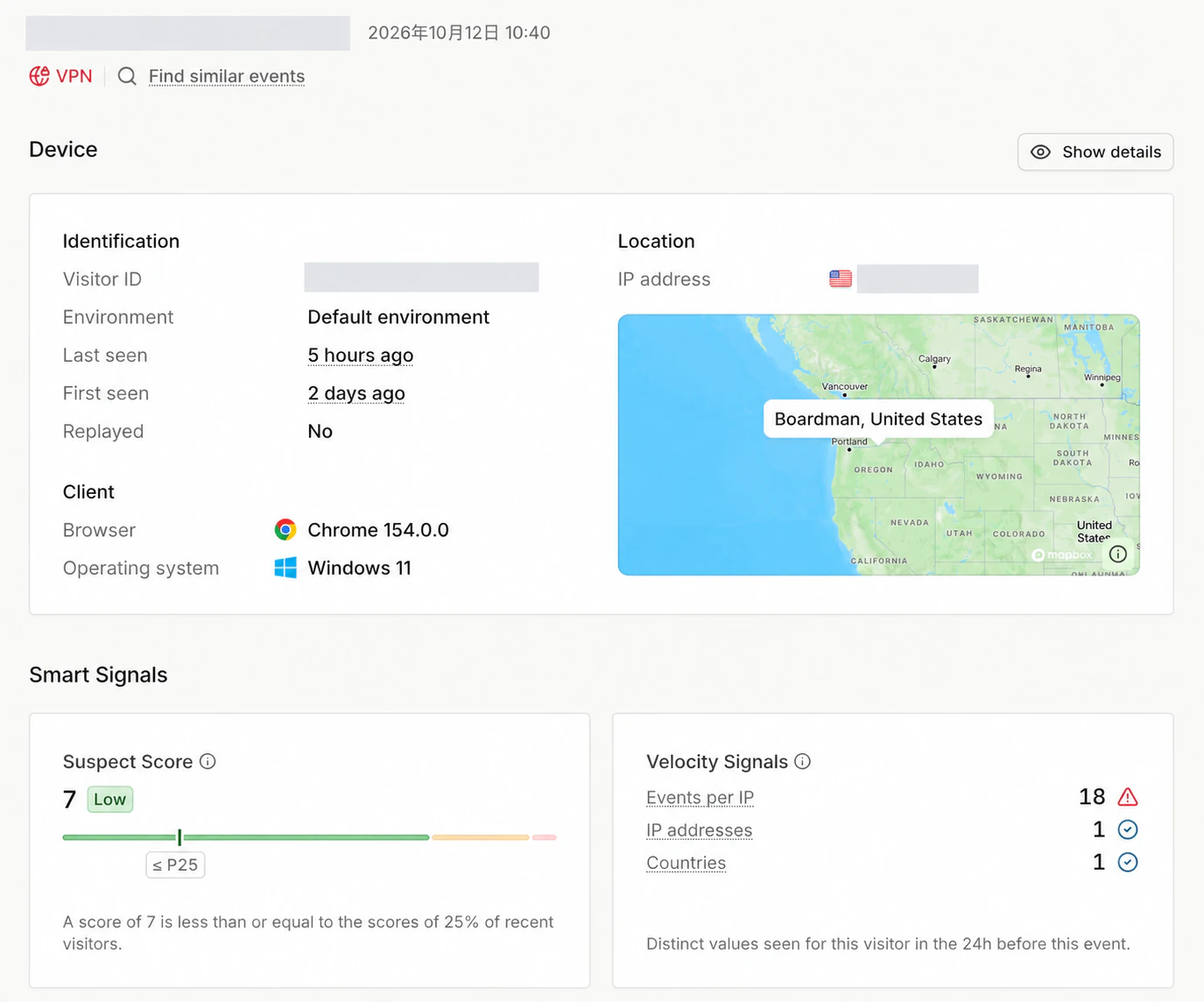
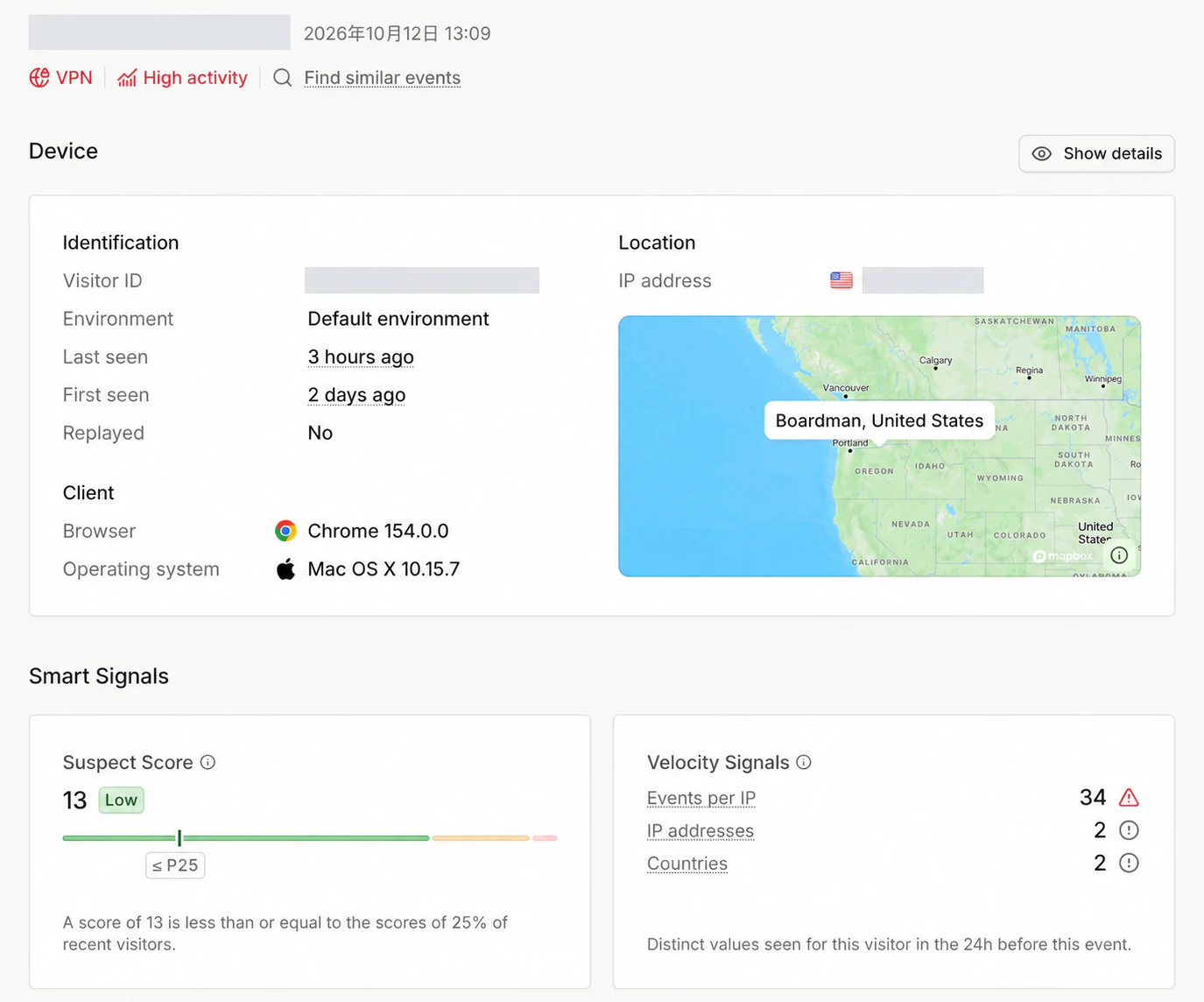
To evaluate the solution, we ran Chrovia on a remote Linux server (Ubuntu) in headless mode, emulating Windows 11 and macOS environments respectively. We tested against Fingerprint.com Pro, an industry-standard commercial fingerprinting and fraud detection platform.
Here are the results:
| Emulated Target | Detected Environment | Suspect Score | Risk Rating |
|---|---|---|---|
| Windows | Windows 11 (Chrome 154.0.0) | 7 | Low |
| macOS | Mac OS X 10.15.7 (Chrome 154.0.0) | 13 | Low |
Analyzing the Scores
In both runs, the test instance was correctly identified as the intended desktop operating system, achieving Suspect Scores in the lowest tier (7 and 13, categorized as Low risk and placing in the lowest 25th percentile of recent traffic).
Importantly, these 7–13 points were driven entirely by proxy IP characteristics and high-frequency requests, rather than any flaws in browser fingerprint emulation:
- Network and Velocity Flags: As shown in the dashboard screenshots, the system explicitly flagged
VPNandHigh activityindicators. These warnings were triggered because the test ran from a cloud datacenter IP and performed multiple rapid requests during testing, setting off rate-limiting and datacenter heuristics. - Zero Fingerprint Tampering Flags: The browser runtime, hardware profile, and rendering checks produced no headless indicators, Linux runtime leaks, or parameter tampering alerts.
This also points to a clear path for reducing the risk score even further: By using higher-quality residential IP resources, matching the corresponding operating system's TCP/IP stack fingerprint (ensuring low-level TCP SYN packet parameters, window sizes, and TTL match the simulated OS rather than exposing a native Linux stack), and throttling request frequencies, the suspect score can be driven down even lower.
In real-world web scraping, overall success rests on coordinating multiple layers of authenticity: browser kernel fingerprinting, clean egress IPs aligned with OS TCP/IP fingerprints, and natural request pacing. Chrovia handles browser identity and runtime consistency at the kernel layer, allowing teams to pair it with solid network resources and sensible scheduling to crawl challenging targets reliably.
Explore Chrovia SDK · Read the SDK Documentation · Contact Us